Displays Localization (Reference) enables multi-language support for HMI applications, allowing runtime language switching with automatic translation of display strings, alarm messages, and system text.
Localization provides:
- Multiple language dictionaries
- Runtime language switching
- Automatic string import
- Online translation services
- Culture-specific formatting
- Component-level control
Enable different text elements for translation based on application requirements.
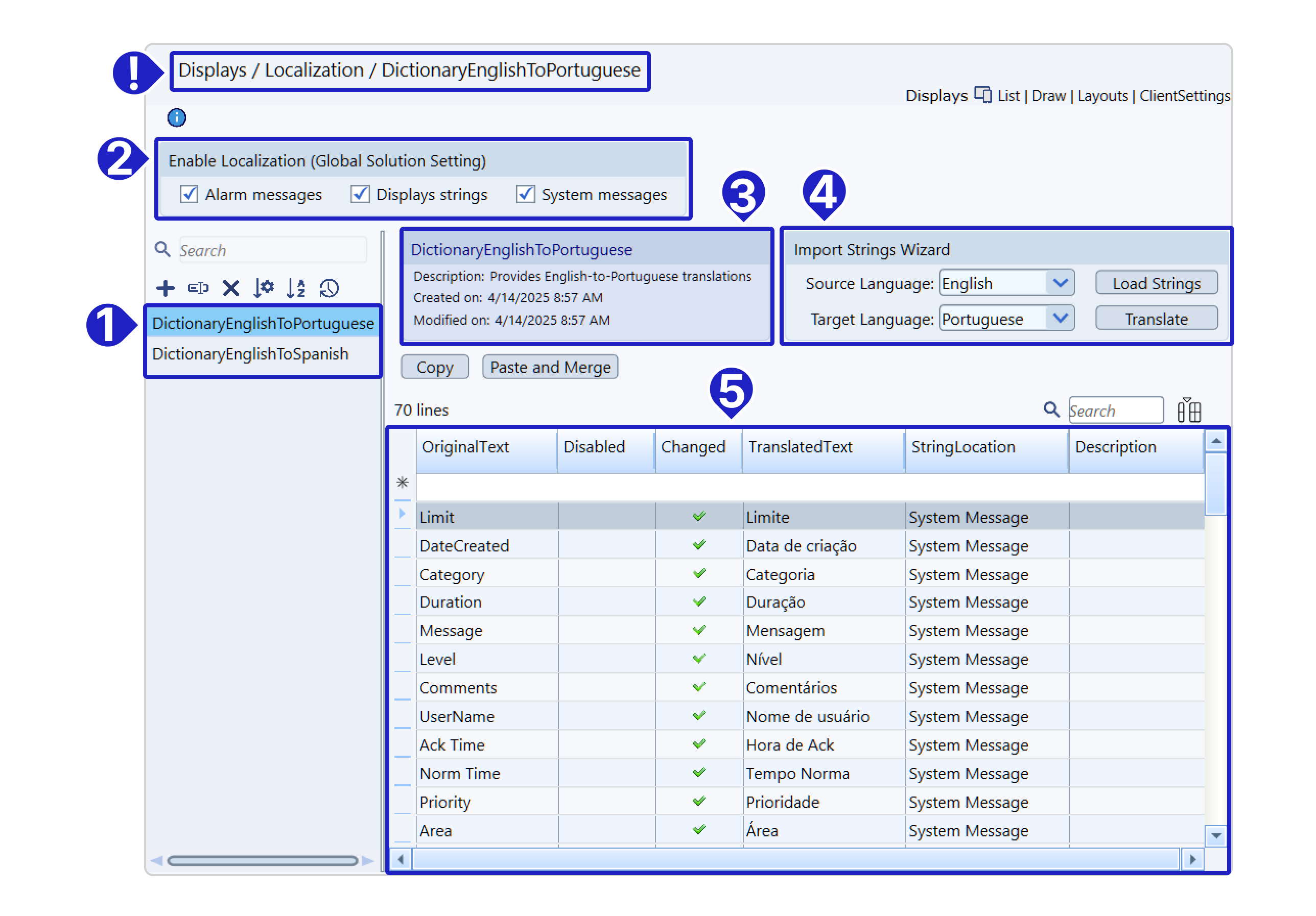
Configuration Settings
Global Localization Options
| Setting | Translates | Location |
|---|---|---|
| Alarm Messages | Alarm text | Alarms → Items → Message |
| Display Strings | UI text | Display objects with Localize enabled |
| System Messages | Platform messages | System dialogs and prompts |
Enable at Displays → Localization → Enable Localization
Creating Dictionaries
Setup Process
- Navigate to Displays → Localization
- Click New to create dictionary
- Name dictionary (e.g., "EN_PT", "EN_ES")
- Enable required localization options
- Click Load Strings to populate
- Enter translations or use auto-translate
Import Wizard Settings
| Field | Description | Example |
|---|---|---|
| Source Language | Original language | English |
| Target Language | Translation target | Portuguese |
| Load Strings | Import enabled strings | All checked items |
| Translate | Use online service | Azure/Google/Libre |
Runtime Language Switching
Set Active Dictionary
csharp
// Method 1: Direct assignment
@Client.Localization = "EN_PT";

// Method 2: Using method
@Client.SetLocalization("EN_ES");

// Check current dictionary
string current = @Client.Localization;
Web Client
The web client (HTML5) does not run the ClientStartup task, in FrameworX 10.1.5 and in 10.1.6. To select the dictionary on both the Rich Client and the web client, set @Client.Localization in the DisplayOpening method of the startup display's code behind:
public void DisplayOpening()
{
    @Client.Localization = "EN_PT";
} |
In FrameworX 10.1.6, the selected dictionary then applies on both clients to display text, Client.Locale lookups and the runtime's own messages. Display text marked for localization also needs Displays strings enabled in Displays → Localization → Enable Localization.
Culture Information
csharp
// Set culture for formatting
@Client.CultureInfo = "pt-BR";  // Portuguese (Brazil)
@Client.CultureInfo = "en-US";  // English (US)
@Client.CultureInfo = "de-DE";  // German (Germany)
Configure default at Solution → Settings → Culture Info
Localization Table Properties
| Property | Description | Type |
|---|---|---|
| ID | Unique identifier | Auto |
| OriginalText | Source string | String |
| TranslatedText | Target translation | String |
| Disabled | Skip translation | Boolean |
| DateCreated | Creation timestamp | DateTime |
| DateModified | Last edit time | DateTime |
| Description | Translation notes | String |
Component Localization
Automatic Translation
When Display Strings enabled:
- All display text auto-translates
- No code required
- Uses active dictionary
Manual Translation
For selective translation:
csharp
// Translate specific string
string translated = @Client.Locale("Original Text");

// In display binding
<TextBlock Text="{Client.Locale('Hello World')}" />
Custom Components
Components requiring special handling:
ComboBox Items:
csharp
public void LocalizeComboBox(ComboBox combo)
{
    foreach(var item in combo.Items)
    {
        item.Text = @Client.Locale(item.Text);
    }
}
DataTable Headers:
csharp
public void LocalizeTable(DataTable table)
{
    foreach(DataColumn col in table.Columns)
    {
        col.Caption = @Client.Locale(col.Caption);
    }
}
Best Practices
- Plan Languages Early - Define requirements upfront
- Use Consistent Keys - Standardize original text
- Keep Text Separate - Avoid hardcoded strings
- Test All Languages - Verify layout with longest text
- Consider Culture - Format dates/numbers appropriately
- Document Context - Add descriptions for translators
- Update Regularly - Maintain dictionary synchronization
Language Switching Example
Implementation Steps
- Enable Localization
   ? Display Strings
   ? Alarm Messages
? System Messages- Create Dictionary
- Name: "EN_PT"
- Load strings from displays
- Translate "Button" → "Botão"
- Runtime Switch
csharp
   // In DisplayOpening of the startup display (Rich Client and web client)
   @Client.Localization = "EN_PT";
The ClientStartup task also selects the dictionary on the Rich Client, but the web client (HTML5) does not run it. See Web Client below.
- Result
- Original: "Button"
- Display: "Botão"
Culture-Specific Formatting
Date/Time
csharp
// US Format: 3/15/2024
@Client.CultureInfo = "en-US";

// European: 15/03/2024
@Client.CultureInfo = "fr-FR";

// ISO Format: 2024-03-15
@Client.CultureInfo = "invariant";
Numbers
csharp
// US: 1,234.56
@Client.CultureInfo = "en-US";

// European: 1.234,56
@Client.CultureInfo = "de-DE";
Translation Services
Supported Providers
- Azure Translator - Microsoft service
- Google Translate - Google API
- LibreTranslate - Open source
Configuration
- Set API credentials
- Select source/target languages
- Click Translate button
- Review and adjust results
Troubleshooting
Text not translating:
- Verify dictionary active
- Check localization enabled
- Confirm string in dictionary
- Review component settings
Wrong formatting:
- Check CultureInfo setting
- Verify OS regional settings
- Test with different cultures
Missing strings:
- Click Load Strings again
- Check all sources enabled
- Review new/modified displays
- Update dictionary
Layout issues:
- Test with longest translations
- Allow controls to auto-size
- Consider text direction (RTL)
- Verify font support
Performance Considerations
Dictionary Loading
- Load at startup
- Cache in memory
- Minimize switches
- Preload all needed
String Lookup
- Use consistent keys
- Avoid runtime concatenation
- Cache frequently used
- Batch translations
Advanced Features
Dynamic Dictionary Loading
csharp
// Load dictionary from database
DataTable dict = @Dataset.Query.Translations.SelectCommand();
@Client.LoadDictionary(dict);
Fallback Languages
csharp
// Try primary, then fallback
string text = @Client.Locale("Key") ??
              @Client.Locale("Key", "EN") ??
              "Default Text";